Assign ownership, track status and make sure decisions actually get carried out.
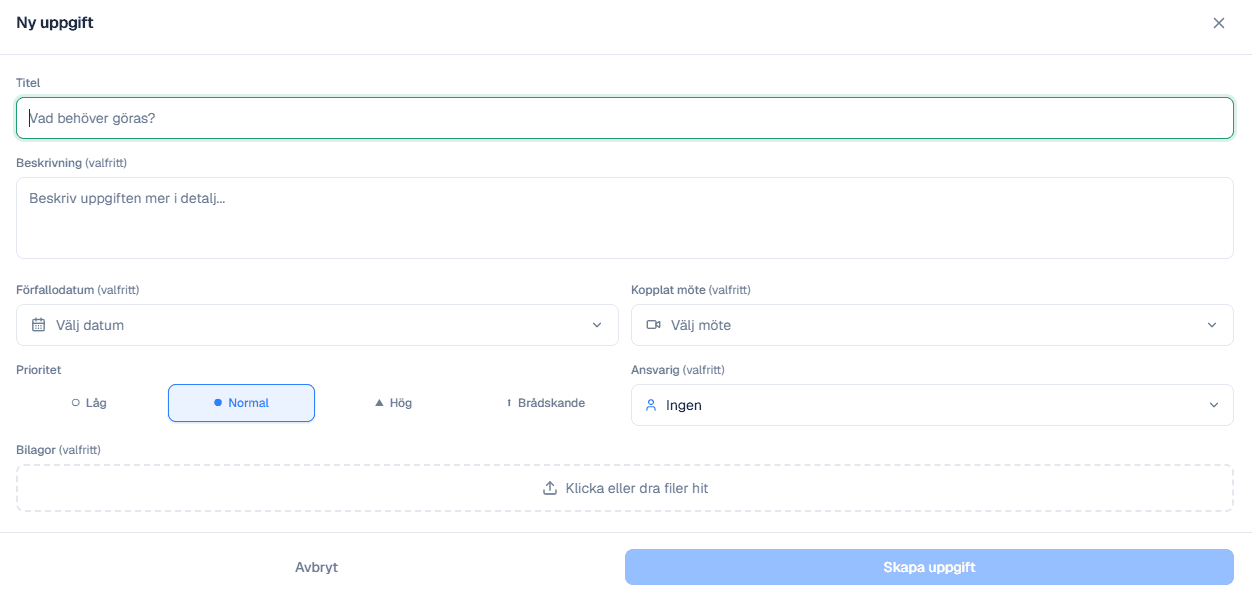
The 'New task' dialog with title, description, due date, linked meeting, priority and assignee
Everything you need in a single dialog.
When the board makes a decision, a comment in the minutes isn't enough. In Strictboard you create a task right away — linked to the meeting where the decision was made, with an owner, due date and priority set from the start.
The difference between a list that moves work forward and one that just grows.
Most boards have tried keeping the action list in the minutes or in a spreadsheet. Both fail on the same thing: the list does not live between meetings.
An action needs a named owner, not a responsible function. Assigning it to the management team or the board means, in practice, nobody.
It needs a date that means something. A due date set to the next board meeting makes everything fall due at once, the evening before.
It needs to carry its context: which decision it came from and what material that rested on. Without that, follow-up becomes a question of who remembers correctly.
And it needs to be visible without anyone looking for it. A list you have to open is a list you open the day before the meeting.
The board must continuously assess the financial position of the company. That duty is hard to evidence without documentation.
A decision without an action is hard to distinguish from a decision that was never carried out. The link between decision, owner and deadline is what makes the difference visible.
Open items that carry over to the next agenda turn follow-up into a routine rather than something the chair has to remember.
The history remains once a task is closed. At audit or review you can show when something was done and by whom.
Tasks can be assigned to the CEO or individual directors without opening the whole archive — the same role control as the rest of the workspace.
Most boards don't lose the decisions. They lose the follow-up.
A task created from the decision carries its context: which meeting, which agenda item and which material it came from. At the next meeting, follow-up becomes a list rather than a memory exercise.
Every task has an owner, a deadline and a priority, and stays on the board's home view until it is closed.
Open tasks automatically become a follow-up item on the next agenda instead of something someone has to remember to raise.
The history remains when a task is closed, so you can show when something was done and by whom.
Everything that ships with decision and task management.
The link to the decision. A task created from a minute item carries which meeting and which material it came from, so follow-up is not a question of who remembers correctly.
Yes, and to individual directors or co-opted attendees, without opening the whole board archive. The same role control applies as for documents.
Yes. Anything not closed carries over as a follow-up item rather than being something the chair has to remember to raise.
The board must continuously assess the company's financial position, and that duty is hard to evidence without documentation. A decision with no traceable action is hard to distinguish from one that was never carried out.
Yes. At audit or review you can show when something was done and by whom, which is the whole point of keeping the list in the system rather than in a spreadsheet.